Second Chair
Get Second Chair

Eight teams. 42 specialists. Plain language.

Ask a team of specialists. Get one clear answer.

Second Chair gives you eight teams of specialists for the decisions, emails, trips and repairs in your week, and it works with the AI you already use.

Mac: ready, download link comingiPhone and iPad, Android, Windows and Web app: coming soon

  • No Second Chair subscriptionHand-off uses the AI app you already have. Chatting inside the app needs a Claude API key, billed by use.
  • Private by designStored only on your device. Sent only to the AI you choose.
  • They draft, you decideNothing is sent, booked or bought for you.

Try it. Pick a question.

Each one goes to a different team. These are example answers.

Start with a question

Pressure-test a decision before you commit.

AI Council

Question: Should I raise my day rate by 20% next quarter? I'm a freelance designer, booked about 80% of the time, and I haven't raised rates in three years.

The Chairman's reportExample answer

Council verdict: raise the day rate 20%

The question before the council

Whether to raise the rate by 20% for everyone next quarter, against two alternatives: leave it alone, or raise it for new clients only. Known: you're booked about 80% of the time and the rate is three years old. Not known: how much of your income comes from your two or three biggest clients.

From the floor

The Operator and the Expansionist agree the raise is overdue: at 80% booked you are full, and three years without a raise is a pay cut. The Pessimist objected to doing it all at once: if one large client leaves, a 20% raise does not cover the hole. The Customer said a good client accepts a raise that comes with notice and a reason, and resents one that arrives on an invoice. The Methodologist asked the question underneath: is the rate the problem, or is it the mix of clients?

The biggest risk: one client who makes up a third of your income walks, and the raise doesn't replace them.

The decision: Proceed with conditions. Raise the rate 20% for all new work now, and move existing clients over 60 days.

Conditions: give existing clients written notice with a date; hold the old rate for work already quoted; decide in advance which one client you would keep at the old rate if they pushed back.

The first step: today, list your clients by share of last year's income. Done looks like one page with a percentage next to each name.

Revisit if: two or more existing clients decline, or your bookings drop below 60% for a month.
Your own question goes here, in the app.

Get Second Chair

The answers above are examples, written to show each team's shape and tone. In the app, answers come from the AI you connect and from what you tell your teams about you.

Why not just ask your chatbot?

It is the AI you already use, with a team's training.

Second Chair does not replace your AI. It adds ready-made teams, each with a method and an answer shape, and a profile you keep on your device.

  • A blank chat box: You have to know what to ask, and how to phrase it.

    A Second Chair team: Each specialist brings a method and is told to ask at most one question back.

  • A blank chat box: One answer, from one point of view.

    A Second Chair team: The Council: five advisers who disagree on purpose, then one verdict. In the app, each adviser answers separately.

  • A blank chat box: The answer arrives in whatever shape comes out.

    A Second Chair team: A consistent shape. Safety first, then the likely cause. The verdict, the biggest risk, the first step.

  • A blank chat box: You tell each AI app about yourself separately.

    A Second Chair team: One profile, kept on your device. It is yours to use with whichever AI you choose. On the Mac, notes from your own documents can be part of it.

  • A blank chat box: Any limits are the ones you remember to ask for.

    A Second Chair team: Limits are written in. Teams are told to draft only, to warn plainly where a qualified professional has to decide, and to check or mark facts that change.

Included teams

Eight teams for work and home. 42 specialists, each with one job.

Each team is a handful of specialists with defined jobs. Every team comes with starter questions, and the ones on the app's first screen change daily, so you do not start from a blank box.

AI Council

Pressure-test a decision before you commit.

  • Should I raise my day rate by 20% next quarter?
  • Pressure-test my plan to launch in two weeks.

6 specialistsPessimist · Expansionist · Customer · Operator · Methodologist · Chairman

Meet the team See an example answer

Chief of Staff

Plan your week, tame your inbox, prep your meetings.

  • Plan my week around these three deadlines.
  • Help me reply to this email politely but firmly.

5 specialistsPlanner · Inbox Manager · Meeting Briefer · Goals Coach · Decision Journal Keeper

Meet the team See an example answer

Research Desk

Find out what's true before you rely on it.

  • Is this statistic I saw online true?
  • Compare these three project tools for a small team.

5 specialistsLead Researcher · Fact-Checker · Skeptic · Numbers Analyst · Explainer

Meet the team See an example answer

Comms Studio

Say the right thing, the right way.

  • Make this email shorter and friendlier.
  • Help me tell a client the budget won't cover their wish list.

5 specialistsEditor · Ghostwriter · Conversation Coach · Presentation Builder · Translator & Culture Adviser

Meet the team See an example answer

Brand Studio

Build a clear, credible presence online.

  • Audit my LinkedIn profile.
  • Plan a month of posts that fits two hours a week.

6 specialistsBrand Strategist · Content Strategist · Social Copywriter · Visual & Video Producer · Growth & Analytics Lead · Community & Reputation Manager

Meet the team See an example answer

House Crew

Keep your home running, safe and efficient.

  • My breaker keeps tripping when the microwave runs.
  • Compare these two roofing quotes.

5 specialistsMaintenance Planner · Repair Guide · Contractor Adviser · Energy Adviser · Garden & Yard Planner

Meet the team See an example answer

Wayfinder

Plan trips, check bookings, handle disruptions.

  • Plan five days in Lisbon in May for two.
  • Should I use points or cash for this flight?

5 specialistsTrip Planner · Points & Miles Optimiser · Logistics Checker · Local Guide · Packing & Prep Specialist

Meet the team See an example answer

Weekender

What's on near you, with links to finish it.

  • Something fun for this Saturday night for two.
  • Rainy Sunday with the kids. Ideas?

5 specialistsScout · Table Finder · Curator · Getaway Planner · Weekend Producer

Meet the team See an example answer

Add-on teams

Six more teams, 34 more specialists. Add one on the Mac when you need it.

  • AV ExpertsSpecialists for live-event audio, video, lighting and more.
  • The AdvocatesFight a bill, claim or refund, with a letter ready.
  • Money RoomPlan the month, cut bills, decide big buys.
  • Career LabGrow your career: opportunities, connections and credentials.
  • Learning StudioA patient tutor for anything you want to learn.
  • Sous ChefWhat to cook, what to buy, and how to keep it safe.

AI Council

Five advisers who disagree on purpose. One verdict.

Bring a decision: a price rise, a hire, a move, a big purchase. When you chat inside the app, your question goes to five advisers separately, and none sees what the others wrote. Then the Chairman weighs their reports and writes one verdict. "See the debate" opens each adviser's report.

What you get back

  • The biggest riskThe one thing most likely to sink it.
  • The decisionOne verdict, with its conditions.
  • The first stepSomething you can start within 48 hours.

A full session is six requests to your AI: five advisers and the Chairman. Follow-up questions are one request. Say "quick council", or turn full sessions off in Settings, and the first question is one request too. If you hand a question off to another AI app, the Council is one pass in that app.

Under the latest answer from any other team, Ask the Council takes your question and that advice to the Council for a second opinion.

Read a Council verdict

  1. The Pessimist

    Finds the way an idea, plan, feature or decision dies.

  2. The Expansionist

    Finds the grounded upside in an idea.

  3. The Customer

    Judges an idea, product, feature or interface from the first-person view of the person on the receiving end.

  4. The Operator

    Turns an idea into execution reality.

  5. The Methodologist

    Tests the question itself.

  6. The Chairman

    Synthesises the five advisors into one decision.

How it works

Three steps. The second one is optional.

  1. Pick the AI you already use

    Hand-off, no key needed. For Claude, ChatGPT, Gemini or Microsoft Copilot. On the Mac, Second Chair prepares the team's complete instructions as files to attach, plus a line to paste. On the other editions it copies a short brief of the team with your question. Paste the answer back and it is saved, so you can carry on.

    Or chat inside the app. This needs a Claude API key. Anthropic bills the key by use, and it is separate from a Claude subscription.

  2. Optional

    Tell your teams about you

    Fill in a short profile and answer a few quick questions per team, so the answers fit your work and your life. Skip it and come back later if you like.

  3. Ask in plain words

    Type it or say it, the way you would to a person, or start from a team's starter questions. You get back a plan, a draft or a verdict.

    Then one tap. When you chat inside the app, the latest answer has follow-ups: Shorter, As a checklist and What first? Another team… takes the answer to a different team.

What it can do

Say it, show it, or hand it off.

  • In-app chat

    A real Council session

    Your first question goes to five advisers separately, none seeing the others. Then the Chairman writes one verdict, and "See the debate" opens each adviser's report.

  • Speak and listen

    A microphone button lets you speak a question, and Listen reads an answer aloud. A question you spoke is read back automatically, unless you turn that off.

  • In-app chat

    Show it a photo

    Take a photo or attach one: a quote, a label, a leak, a menu. It goes to your AI with that one message, and the picture is not saved in the conversation.

  • Near me now

    Weekender, Wayfinder and House Crew have a pin button. One tap adds where you are to that one request. Location is asked for only on the tap, rounded to about a kilometre, and not stored.

  • Hand-off, there and back

    Using the Claude, ChatGPT, Gemini or Microsoft Copilot app and no key? Second Chair keeps your question as a conversation. Paste the answer back and it is saved, so you can carry on from it.

  • Facts with a date

    A fact that carries a check date shows a small "checked" mark with the month and year. A fact the team could not confirm is marked "Check this".

"In-app chat" means chatting inside Second Chair with a Claude API key. In hand-off, the Council is one pass in your AI app and photos are not sent.

Private by design

Stored on your device. Sent only to the AI you choose.

There is no Second Chair server and no Second Chair account. What you tell your teams is stored only on your device.

Read the privacy summary

  • Stored on your device

    Your profile, your conversations and your notes are stored only on your own device. There is no Second Chair account to create.

  • Sent only to the AI you choose

    When you chat in the app, your question, that conversation and what the team needs to know about you go to the AI you chose, and nowhere else.

  • Mac only

    The Library: you approve every note

    Choosing a folder starts it. Files that look private (passwords, bank, tax, ID) are skipped. Text from the others is sent to your AI to write short notes, and you approve every note before any team uses it.

  • It never acts for you

    Nothing is sent, posted, booked, bought or paid on your behalf. Your specialists draft. You decide.

Make it yours

They get to know you. You can build your own.

A profile and a few answers per team shape the answer. On the Mac you can go further.

  • Mac only

    Draft a team from a sentence

    With an AI connected in the app, describe the team you wish you had. A guided builder drafts its specialists and their jobs for you to review.

  • Mac only

    Share a team as one file

    A team packs into a single .chair file. Send it to a friend or a colleague who also uses Second Chair on a Mac. Teams with personal details or non-text files are refused.

  • Mac only

    Name your specialists

    They arrive as roles: the Planner, the Editor, the Pessimist. Give them names if you would like to. It is optional.

Knowledge updates (Mac). Off unless you say yes; the welcome and Settings ask. When they are on, and an AI is connected in the app, teams whose facts change re-check the web every 3 months, while the app is open. Each update uses your AI allowance.

On every device

The eight included teams on every device.

The eight included teams are made for Mac, iPhone and iPad, Android, Windows and the web. Add-on teams are on the Mac only. What is available today is listed just below.

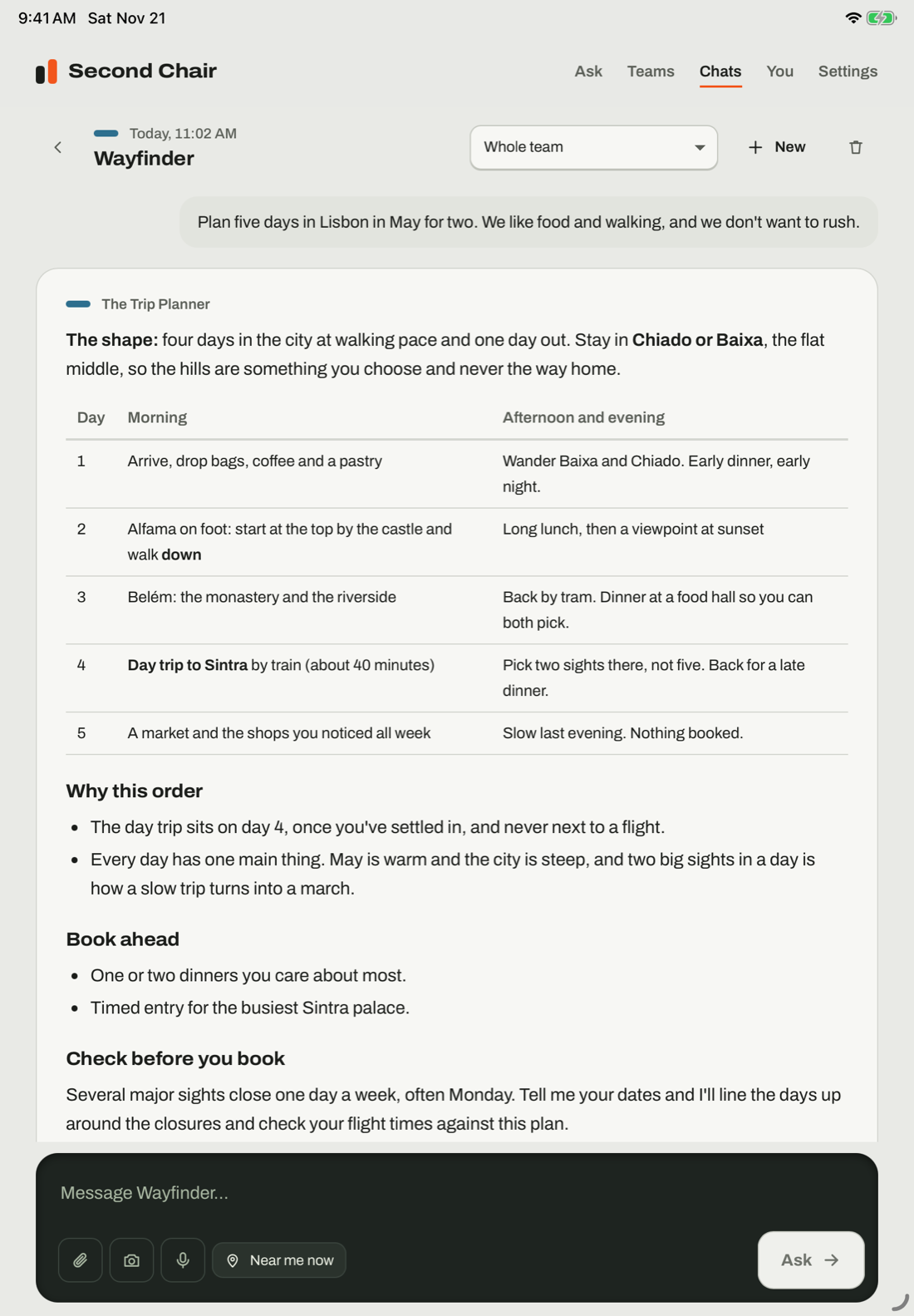
Second Chair on an iPad: Wayfinder's Trip Planner answering with a day-by-day table for five days in Lisbon
iPad
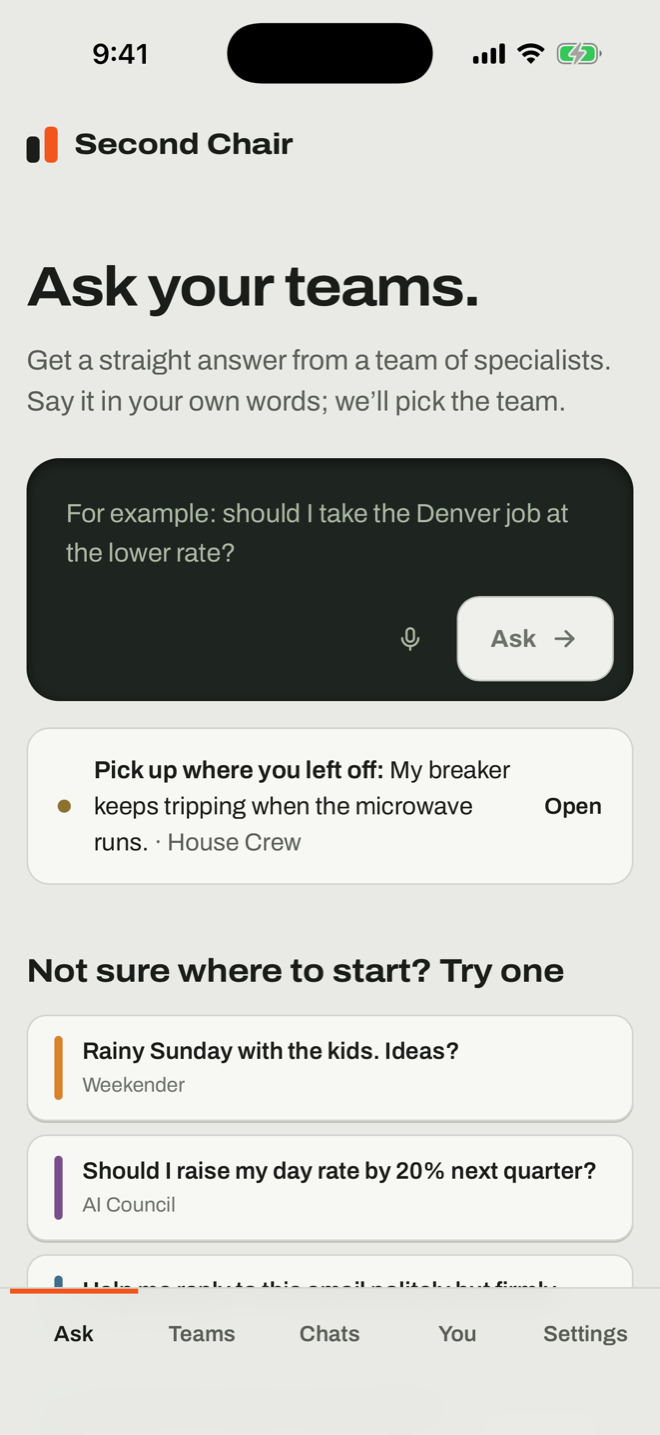
Second Chair on an iPhone: the Ask screen, with the question box and starter questions for each team
iPhone
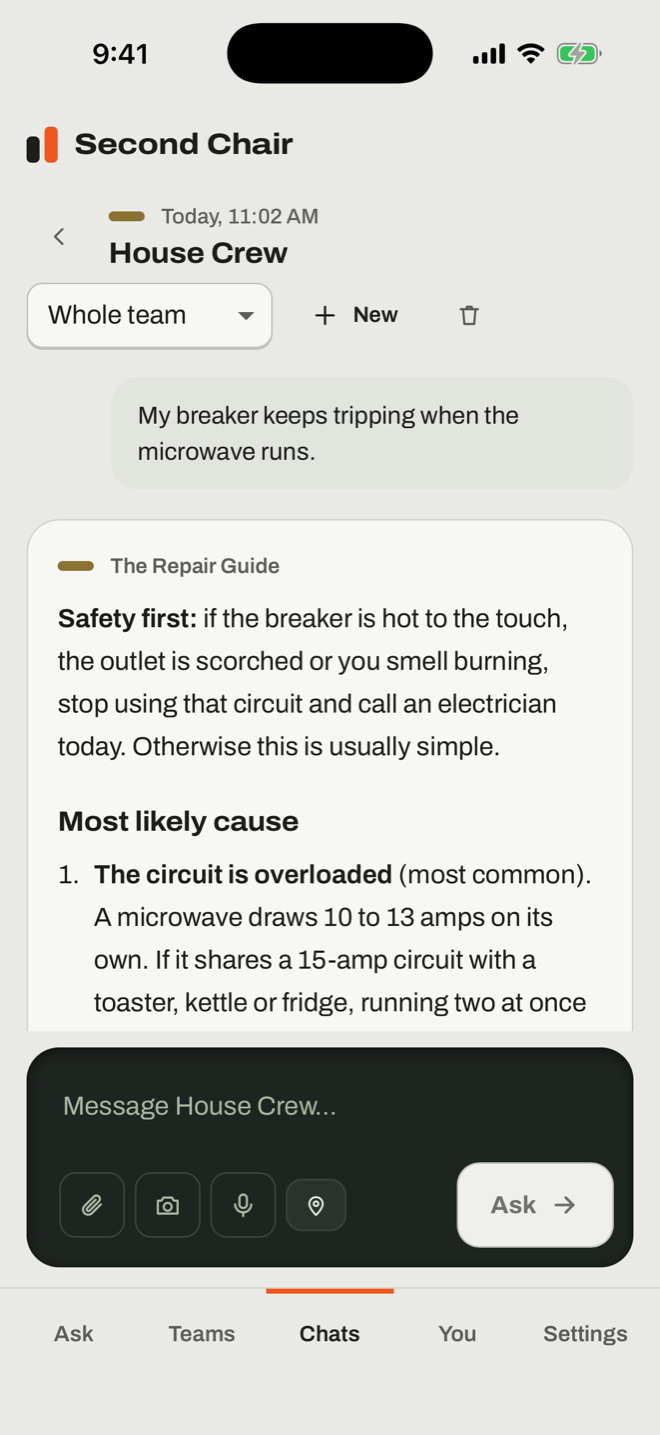
Second Chair on an iPhone: the House Crew's Repair Guide answering a question about a breaker that trips when the microwave runs
iPhone
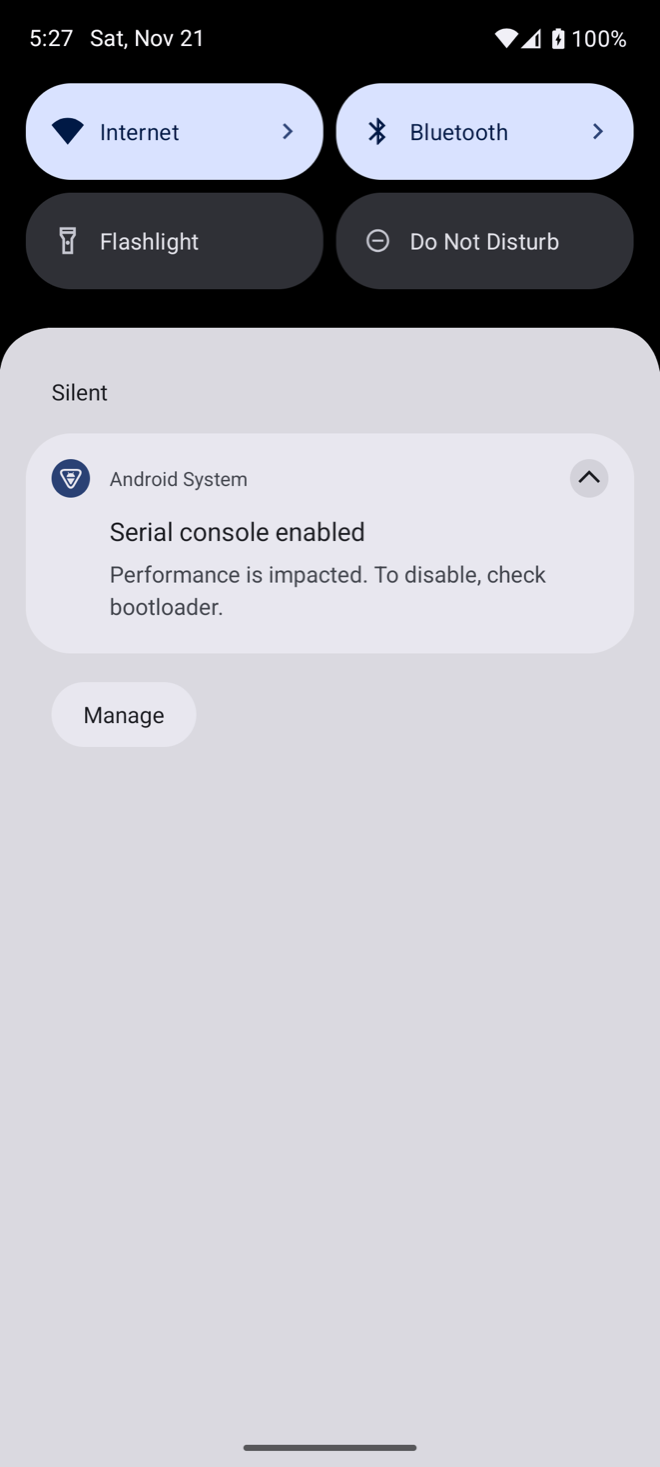
Second Chair on Android, a test build running in an emulator: the House Crew's Repair Guide answering the same question about a breaker that trips when the microwave runs
Android, a test build in an emulator

Real screens from the app: iPad and iPhone in Apple's simulator and Android as a test build in an emulator. The answers in them are example answers.

  • A start without an AI

    The welcome has "I don't use an AI yet", with links to the free Claude, ChatGPT and Gemini apps. On a phone it asks for a first name and a town up front, so the first answer is local.

  • Stored on that device

    Your profile and your conversations are stored only on the device you are using. On iPhone and iPad, your Claude key is kept in the device Keychain.

  • Your profile travels with you

    Save your profile as one small file and open it on your other devices, so they know you too. There is no account, and Second Chair syncs nothing itself.

Get it

One full desktop app. A portable edition for everywhere else.

Mac

Ready: download link coming

The full desktop app. Nothing else to install.

  • The eight included teams, and add-on teams when you want them
  • Hand-off: the team's complete instructions as files to attach to the AI app you already use, plus a line to paste. Paste the answer back and carry on from it
  • Speak a question, and listen to an answer
  • Near me now, for Weekender, Wayfinder and House Crew
  • Your profile, which you can take to your other devices as a file
  • Share a team as a single .chair file
  • Names for your specialists, if you want them
  • A three-step welcome, starter questions, and an example answer for every included team and for the add-ons that have one

When you chat inside the app, with a Claude API key

  • A full Council session: five advisers separately, then the Chairman's verdict
  • Attach a photo, or PDF, Word, PowerPoint and Excel files. Documents are read on your Mac and only the text is used
  • Answers that search the web list their sources
  • The Library: choose a folder and your AI writes short notes about you from the files in it, skipping any that look private. You approve every note before a team uses it
  • Draft your own team from a sentence
  • Knowledge updates, off unless you say yes: teams whose facts change re-check the web every 3 months, while the app is open. Each update uses your AI allowance

The portable edition

For iPhone and iPad, Android, Windows and the web

  • The eight included teams
  • An example answer for every included team
  • Hand-off: a short brief of the team (its roster, limits and answer shape) copied with your question. Paste the answer back and carry on from it
  • Speak a question, and listen to an answer. In a browser this needs a browser that has a speech feature
  • Near me now, for Weekender, Wayfinder and House Crew
  • Your profile, which you can save as a file and open on another device

When you chat inside the app, with a Claude API key

  • A full Council session: five advisers separately, then the Chairman's verdict
  • Take or attach a photo, and attach PDFs
  • Answers that search the web list their sources
  • Conversations saved on the device

The Library, the team builder, knowledge updates, add-on teams, sharing a team as a file and naming your specialists are Mac-only for now. The Windows edition is a download that opens in its own window, using Edge or Chrome.

iPhone and iPad

Coming to the App Store for $7.99.

Coming soon

Android

Built and running in a test phone. Not yet on Google Play.

Coming soon

Windows

Built. Testing on Windows comes next.

Coming soon

Web app

Runs in your browser.

Coming soon

Pricing

One price. No Second Chair subscription.

You pay for Second Chair once. The AI is not included: you bring your own.

Hand-off uses the AI app you already have. Chatting inside Second Chair needs a Claude API key. Anthropic bills the key by use, and it is separate from a Claude subscription.

$7.99one-time

Your first 10 questions are free. Example answers are always free.

  • 8 teams and 42 specialists, ready to ask
  • 6 add-on teams for the Mac: AV Experts, The Advocates, Money Room, Career Lab, Learning Studio and Sous Chef
  • The app for Mac

Get Second ChairNo account. No tiers.

Questions

Fair questions, short answers.

Do I need an API key?

Not for hand-off. Hand-off works with the Claude, ChatGPT, Gemini or Microsoft Copilot app you already use. On the Mac, Second Chair prepares the team's complete instructions as files to attach, plus a line to paste. On the other editions it copies a short brief of the team (its roster, limits and answer shape) with your question.

Second Chair keeps your question as a conversation. Paste the answer back and it is saved, so you can carry on. It asks once whether to include your profile in what it prepares.

Chatting inside Second Chair needs a Claude API key. Anthropic bills the key by use, and it is separate from a Claude subscription.

These need chat inside the app: a full Council session, photos and PDFs, sources, the Shorter, As a checklist and What first? follow-ups, the Library, drafting a team from a sentence, and knowledge updates.

What if I don't use an AI yet?

The welcome has an "I don't use an AI yet" choice, with links to the free Claude, ChatGPT and Gemini apps. Pick one, then use hand-off. No key is needed.

Which AIs does it work with?

Hand-off works with Claude, ChatGPT, Gemini and Microsoft Copilot. In-app chat works with a Claude API key.

The Mac app also has experimental connections for the OpenAI API, the Gemini API, ChatGPT plan sign-in, Ollama and LM Studio. Only the Claude API key has been fully tested.

Where is my data?

Your profile, conversations and notes are stored only on your device. There is no Second Chair account.

When you chat in the app, your question, that conversation and what the team needs to know about you go to the AI you chose, and nowhere else.

Your Claude key is kept in the device Keychain on iPhone and iPad, in the Mac's Keychain on a Mac, and in encrypted storage on the device on Android. On Windows and in the web app it is kept in the app's own storage in the browser on that device, which Second Chair does not encrypt.

Do my devices sync?

Second Chair syncs nothing itself. There is no Second Chair server and no account.

On a Mac, your profile folder lives in Documents › Second Chair, which iCloud may sync if you have iCloud Desktop & Documents turned on.

You can carry your profile from one device to another as a file: under You, choose "Save my profile as a file" and open it on the other device. The file never includes your AI key or your conversations.

Conversations are stored only on the device where you had them.

Is it another subscription?

One price, once. No Second Chair subscription.

There is no Second Chair account either. Hand-off uses the AI app you already have. Chatting inside Second Chair needs a Claude API key. Anthropic bills the key by use, and it is separate from a Claude subscription.

What can't it do?

It does not act for you. Nothing is sent, posted, booked, bought or paid on your behalf.

The quality of an answer depends on the AI you connect.

The Library, the team builder, knowledge updates, add-on teams, sharing a team as a file and naming your specialists are Mac-only for now.

Can I try it before I buy?

You can see what you would get. The demo on this page shows an example answer from every included team.

Inside the app, each included team has "See an example answer" before you connect anything.

Can I make my own team?

Yes, on the Mac, with an AI connected in the app. Describe the team you want in a sentence and a guided builder drafts it for you to review.

On the Mac you can also share a team as a single .chair file. Teams with personal details or non-text files are refused.

What are the specialists, exactly?

Each specialist is a set of carefully written instructions, methods and reference knowledge. Together they make a general AI behave like a specific expert with a defined job.

They are roles, such as the Pessimist or the Editor, and not people.

When you chat inside the app, a full Council session asks your AI six times: once for each of the five advisers, separately, and once for the Chairman's verdict. It is one AI answering in five roles, not five different AIs. In hand-off, the Council is one pass in your AI app.

Pull up a second chair for the week ahead.

Get Second Chair